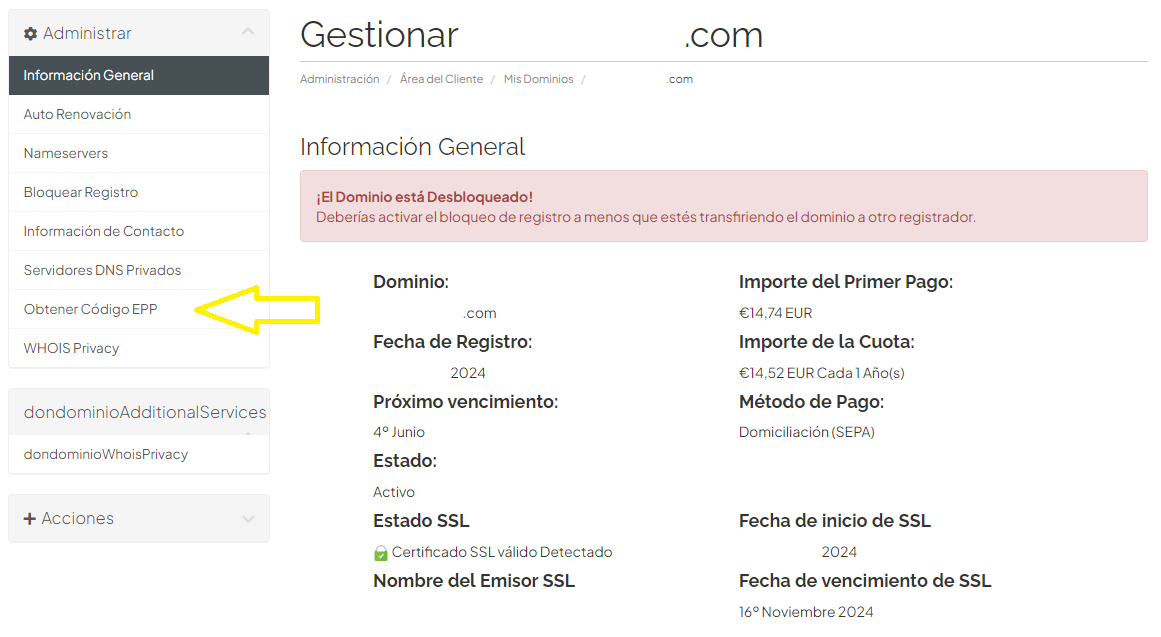
Cómo obtener el código EPP o Authcode


En nuestros servicios la obtención de el código de EPP es muy sencillo:


  1. Entrar en nuestra área de cliente my.creativekit.es.

  2. Pulsar en Dominios y después en Mis Dominios.

  3. Aparecerán todos los dominios contratados.

  4. Pulsar encima del dominio del cual se quiera saber el código.

  5. Pulsar en Obtener Código EPP.

  • dominios
  • 0 Users Found This Useful
Was this answer helpful?

Related Articles

Our DNS of CreativeKit

If you have contracted a web hosting in Creativekit.es, there are two options: DNS of...

How to create a subdomain or add a new domain to your hosting.

Access my.creativekit.es. Enter your hosting cPanel where you are going to use the subdomain....

How to change the DNS (Domain Name Server) of your domain.

In the Customer Area of my.creativekit. Click on Domains and then My Domains On the center of...

How to register new domains

Click on Domains and then on Register Domains on the upper bar orclick on Register included in...

How to transfer domains

Click on Domains and then on Transfer Domains from the upper bar orClick on Transfer included...